0 · Recall Warm-up
Answer from memory first. Answers are in the Answer Vault at the bottom.
- What is 1 + 2 + 4 + … + 2⁷? from Lesson 0.2.2
- How many different patterns do 8 bits have? from Lesson 0.1.2
- What does
printfprint after"%d"unless you write\n? from Lesson 0.1.1
1 · The Hook
🎣
A banking app keeps several kinds of values: your balance (can be negative, can be large), your age (small, never negative), the interest rate 6.75 (has a fraction), and your grade letter ‘A’. Putting a fraction into a whole-number box loses the .75; putting a large balance into a tiny box wraps it into nonsense.
C makes you choose the kind of box for every variable. That choice fixes how many bytes it takes, which values fit, and how the bits are read.
2 · Predict First
🤔
What does this print on our 32-bit machine?
printf("%u %u %u\n", sizeof(char), sizeof(int), sizeof(double));
Make a guess in your head. The answer opens Section 3.
3 · Core Concept
💡
Predict First — the answer
Output
1 4 8
A char takes 1 byte, an int 4 bytes, a double 8 bytes. sizeof reports the size of a type in bytes.
What a data type fixes
A data type tells the compiler three things: how many bytes the value occupies, how its bits are read (whole number, fraction, character), and therefore which values fit.
The basic types and their sizes
| Type | Holds | Size here (32-bit) | printf |
|---|---|---|---|
char | one character, or a small integer | 1 byte | %c (as a character), %d (as a number) |
short | small whole number | 2 bytes | %d |
int | whole number | 4 bytes | %d |
long | whole number | 4 bytes (8 on 64-bit Linux) | %ld |
long long | big whole number | 8 bytes | %lld |
float | number with a fraction, about 7 digits | 4 bytes | %f |
double | number with a fraction, about 15 digits | 8 bytes | %f |
C fixes only the minimums: char is always 1 byte, and sizeof(short) ≤ sizeof(int) ≤ sizeof(long) ≤ sizeof(long long). Real sizes depend on the machine, which is why GATE questions state them. Compiled for 64-bit, the same sizeof(long) printed 4 here (Windows keeps long at 4 bytes; 64-bit Linux makes it 8).
sizeof
sizeof(type) or sizeof variable gives the size in bytes. It is an operator worked out by the compiler, not a function. Its value is an unsigned number; on our machine print it with %u (the fully portable form is %zu).
printf("char %u, short %u, int %u, long %u\n", sizeof(char), sizeof(short), sizeof(int), sizeof(long));
printf("long long %u, float %u, double %u\n", sizeof(long long), sizeof(float), sizeof(double));
Output
char 1, short 2, int 4, long 4
long long 8, float 4, double 8
Signed and unsigned
With n bits, an unsigned type uses every pattern for values 0 to 2^n^ − 1. A signed type (the default for short, int, long) gives the top bit a negative weight of −2^n−1^ (this is called two’s complement), so it holds −2^n−1^ to 2^n−1^ − 1.
| Bits | unsigned range | signed range |
|---|---|---|
| 8 (char) | 0 … 255 | −128 … 127 |
| 16 (short) | 0 … 65,535 | −32,768 … 32,767 |
| 32 (int) | 0 … 4,294,967,295 | −2,147,483,648 … 2,147,483,647 |
Note the lopsided signed range: one more negative value than positive. Write unsigned int u; to get an unsigned box. Plain char is signed on most machines (including ours), but C leaves that choice to the compiler.
Constants (literals)
42is an int;42uunsigned;42Llong.3.75is a double;3.75fa float.'A'is a character constant: its value is the character code, 65. Codes to remember:'0'= 48,'A'= 65,'a'= 97.0x1Fis hexadecimal (31). A leading zero means octal (base 8):010is 8, not 10.
const
const int N = 10; creates a variable that may not be changed afterwards. N = 11; is a compile-time error.
Declaring variables
Every variable must be declared before use, with its type. Several may share a line: int a, b = 5, c; declares three ints but gives only b a first value.
Declaration vs definition
A declaration announces a name and its type. A definition also reserves the memory (and may give a first value). For the variables you have met, every declaration is also a definition. Later lessons show declarations that are not definitions: announcing a function before writing its body (1.3.1) and naming a variable that lives in another file (1.3.2). A name may be declared many times but defined only once.
4 · Visual
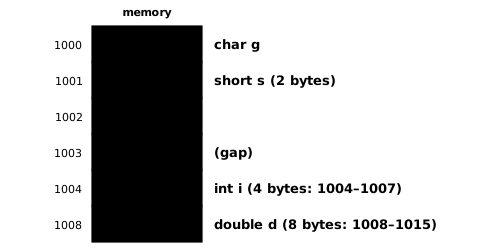
Different types take different numbers of bytes. Each row here is one variable starting at the shown address (for i and d only the first byte is drawn). Compilers often leave gaps so that bigger values start at addresses divisible by their size.
Ranges on a number line (32-bit int):

 signed int    |-2,147,483,648 ............ 0 ............ 2,147,483,647|
 unsigned int                              |0 ...................................... 4,294,967,295|

 8 bits:   unsigned char   0 .. 255          signed char   -128 .. 127
           bit weights (signed):  -128  64  32  16  8  4  2  1
           11111111 = -128+64+32+16+8+4+2+1 = -1      10000000 = -128
Signed types spend half the patterns on negative values; the top bit carries weight −2ⁿ⁻¹.
5 · Worked Examples
Example 1 Easy
Which type would you use for: a person’s age, the price ₹99.95, the letter of a grade, the population of India (about 1.4 billion)?
Solution
Age: int (or unsigned char, 0–255). Price: double (it has a fraction). Grade: char. Population: 1.4 billion fits in an int (max about 2.1 billion), but an unsigned int or long long gives more room.
Example 2 Medium
What does this print?
int a, b = 5, c;
a = 1;
c = a + b;
printf("%d %d %d\n", a, b, c);
Solution
int a, b = 5, c; gives only b a first value. Then a = 1 and c = 1 + 5.
Output
1 5 6
Example 3 GATE
What does this print?
int x = 010 + 0x10 + 10;
printf("%d %d %d\n", 010, 0x10, x);
Solution
010 starts with 0, so it is octal: 1 × 8 = 8. 0x10 is hexadecimal: 1 × 16 = 16. So x = 8 + 16 + 10 = 34.
Output
8 16 34
6 · GATE Traps
⚠️
- A leading zero makes an octal constant:
010is 8 and09is an error (9 is not an octal digit). int a, b = 5;initializes only b.- Sizes are machine-dependent; use the sizes the question states. Only
sizeof(char) == 1is guaranteed. - Signed ranges are lopsided: a signed char goes down to −128 but only up to 127.
'A'(single quotes) is a number, 65;"A"(double quotes) is a string literal of two characters (A and an end marker met in 1.5.3).
8 · Memory Hook
🧠
“Choose the box before you pour.” char is a cup (1 byte), short a mug (2), int a jug (4), double a bucket (8). Signed boxes keep half their space for the negatives.
9 · Connect the Dots
Lesson 0.1.2 introduced int; now every basic type has a size and a range, which uses the powers of 2 from Lesson 0.2.1. Values in these boxes are useless unless we can compute with them. Next lesson answers: which operations can combine values, and in what order are they carried out when several appear in one line?
10 · Self-Test
GATE format. Try every question before opening the vault.
Q1MCQ1 markOutput
On our 32-bit machine, what does this print?
printf("%u %u\n", sizeof(short), sizeof(long long));
- (A)
2 8 - (B)
1 8 - (C)
2 4 - (D)
4 8
Q2NAT1 markRanges
What is the largest value a signed 16-bit integer can hold?
Numerical answer: ________
Q3MCQ1 markConstants
The constant 017 in C has the value:
- (A) 17
- (B) 15
- (C) 7
- (D) 23
Q4MSQ1 markTypes
Which statements are true in C?
- (A)
sizeofis an operator, not a function. - (B) An
unsigned intcan hold −1. - (C)
sizeof(char)is always 1. - (D) An 8-bit signed char holds values from −128 to 127.
Q5MCQ2 marksOutput
What does this print?
printf("%d %d %d\n", 012, 0x1A, 12);
- (A)
12 26 12 - (B)
10 1A 12 - (C)
12 0x1A 12 - (D)
10 26 12
11 · Rule Card
- Sizes here: char 1, short 2, int 4, long 4, long long 8, float 4, double 8; only char = 1 is guaranteed.
- n bits: unsigned 0 … 2ⁿ − 1; signed −2ⁿ⁻¹ … 2ⁿ⁻¹ − 1.
sizeof= size in bytes, an operator; print with %u (or %zu).- Literals: 42, 42u, 42L, 3.75 (double), 3.75f, 'A' = 65, 0x.. hex, 0.. octal.
constvariables cannot be assigned again.- Declaration = name + type; definition = declaration + memory. Defined once, declared many times.
12 · Concept Ledger
Unlocked in this lesson. From here on, these terms may be used.
data typecharshortlonglong longfloatdoublesizeofsigned / unsignedtwo's complement rangecharacter constant / character codeoctal and hexadecimal constantsconstdeclaration vs definition%c %u %ld %f
13 · Answer Vault
Answer Vault
Try the questions first. Open when you are ready to check.
Recall Warm-up
- 255 = 2⁸ − 1.
- 256 (2⁸).
- Nothing extra: printf never adds a new line by itself.
Self-Test
Q1 Answer: (A)1 mark
short is 2 bytes, long long 8.
Output
2 8
- (B) is wrong: short is 2 bytes, not 1.
- (C) is wrong: long long is 8 bytes.
- (D) is wrong: short is 2 bytes.
Re-read: Lesson 1.1.1 — Data types and their sizes; signed vs unsigned; constants; variables; declaration vs definition
Q2 Answer: 327671 mark
2¹⁵ − 1 = 32767.
Re-read: Lesson 1.1.1 — Data types and their sizes; signed vs unsigned; constants; variables; declaration vs definition
Q3 Answer: (B)1 mark
Leading 0 means octal: 1 × 8 + 7 = 15.
- (A) is wrong: It is not decimal.
- (C) is wrong: Both digits count.
- (D) is wrong: 23 would be hexadecimal 0x17.
Re-read: Lesson 1.1.1 — Data types and their sizes; signed vs unsigned; constants; variables; declaration vs definition
Q4 Answer: (A) (C) (D)1 mark
Unsigned types have no negative values.
- (B) is wrong: Unsigned values are never negative.
Re-read: Lesson 1.1.1 — Data types and their sizes; signed vs unsigned; constants; variables; declaration vs definition
Q5 Answer: (D)2 marks
012 is octal 10; 0x1A is hexadecimal 26; %d prints decimal.
Output
10 26 12
- (A) is wrong: 012 is octal.
- (B) is wrong: %d prints decimal, not hex digits.
- (C) is wrong: %d prints the value, not the spelling.
Re-read: Lesson 1.1.1 — Data types and their sizes; signed vs unsigned; constants; variables; declaration vs definition