0 · Recall Warm-up
Answer from memory first. Answers are in the Answer Vault at the bottom.
- What does the compiler produce when your source code has no errors? from Lesson 0.1.1
- How many characters does
"\n\n"contain? from Lesson 0.1.1 - Where does every C program start running? from Lesson 0.1.1
1 · The Hook
🎣
A shopkeeper adds up a bill: price 40, quantity 3, total 120. While working, she writes each number on a slip and keeps the slips in labelled trays: “price”, “quantity”, “total”. When the quantity changes, she crosses out the old number in that tray and writes the new one.
A program needs the same thing: places to keep numbers while it runs, each with a label, each able to change. This lesson shows what those places are inside a computer.
2 · Predict First
🤔
What does this print?
int a = 3;
int b = 4;
a = b;
b = a;
printf("%d %d\n", a, b);
Make a guess in your head. The answer opens Section 3.
3 · Core Concept
💡
Predict First — the answer
Output
4 4
a = b; copies 4 into a, and the old 3 is gone for ever. Then b = a; copies that 4 back into b. Assignment overwrites; it never swaps.
Bits
A bit is the smallest piece of information: a single 0 or 1, like a switch that is off or on. One bit has 2 possible patterns. Two bits have 4 (00, 01, 10, 11). Three bits have 8. Each extra bit doubles the number of patterns, because every old pattern can be followed by a 0 or by a 1.
Bytes
A byte is a group of 8 bits. Doubling 8 times from 1 gives 256, so one byte has 256 possible patterns. Memory sizes and data sizes are counted in bytes.
Memory: numbered boxes
The computer’s main memory is a very long row of boxes, each holding one byte. Every box has a number, its address, starting from 0. To read or change a byte, the processor names its address.
A value that needs more than one byte occupies several consecutive boxes. Its address is the address of its first byte.
A variable is a named box
A variable is a named piece of memory that holds a value which can change. In C you must say what kind of value it holds before using it:
int count;
This asks for a box big enough for one whole number (int). On the machine these notes assume, an int takes 4 bytes, so count occupies 4 consecutive addresses, say 1000 to 1003, and its address is 1000. You use the name; the compiler keeps track of the address.
Assignment: store, then forget the old value
x = 5; means “store 5 in the box called x”. The old content is overwritten. The right side is worked out first, using the current values, and only then stored. That is why
x = x + 1;
makes sense: read x, add 1, store the result back into x. The = sign in C means store, not “is equal to”.
Giving a first value
int x = 5; creates the box and stores 5 in it straight away. If you create a variable inside main without a first value (int y;) its box holds whatever bits were left there before: an unpredictable value. Using it before storing something is a bug.
Printing a variable
Inside the string literal given to printf, the pair %d is a placeholder: it is replaced by the value of the next item after the string, written as a whole number. Several placeholders are filled in order:
printf("%d %d\n", a, b); /* first %d gets a, second gets b */
Naming rules
A name (an identifier) may use letters, digits and the underscore _, must not start with a digit, and must not be a word C reserves for itself (a keyword such as int or return). Names are case-sensitive: total and Total are different variables.
4 · Visual
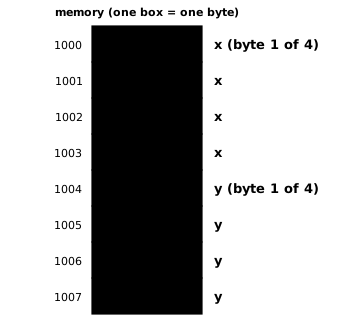
int x = 5; int y = 9; — each int uses four consecutive one-byte boxes. The address of x is 1000, the address of y is 1004 (addresses chosen for the picture; the real ones depend on the machine).
Trace of:  int a = 3;  int b = 4;  int t;  t = a;  a = b;  b = t;

statement      a     b     t
-----------    ---   ---   ---
int a = 3;      3     -     -
int b = 4;      3     4     -
int t;          3     4     ?      <- unpredictable until stored
t = a;          3     4     3
a = b;          4     4     3
b = t;          4     3     3      -> prints "4 3"
A trace table: one row per statement, one column per variable, showing the state after the statement runs.
5 · Worked Examples
Example 1 Easy
What does this print?
int x = 5;
x = 8;
x = x + 2;
printf("%d\n", x);
Solution
x = 5, then 8 (5 is gone), then 8 + 2 = 10.
Output
10
Example 2 Medium
What does this print?
int p = 2;
int q = p + 3;
p = q + p;
q = p - q;
printf("p = %d, q = %d\n", p, q);
Solution
| statement | p | q |
|---|---|---|
int p = 2; | 2 | – |
int q = p + 3; | 2 | 5 |
p = q + p; | 7 | 5 |
q = p - q; | 7 | 2 |
Output
p = 7, q = 2
Each right side uses the values at that moment: in the last line p is already 7.
Example 3 GATE
Swap the values of a (3) and b (4). Why does a = b; b = a; fail, and what fixes it?
Solution
The first assignment destroys a’s old value, so both end as 4 (the Predict First question). Keep a copy in a third box first:
int a = 3;
int b = 4;
int t;
t = a;
a = b;
b = t;
printf("%d %d\n", a, b);
Output
4 3
The trace table in the Visual section shows every step.
6 · GATE Traps
⚠️
=stores; it is not a question.a = bcopies b into a and destroys a’s old value.- The right side is computed with the values before the store: in
p = q + pthe old p is used. - A multi-byte value’s address is the address of its first byte; an int at 2000 also occupies 2001, 2002 and 2003.
- A variable created without a first value holds an unpredictable value; never print or use it before storing.
- Names are case-sensitive and cannot start with a digit:
2ndis not a valid name;_countis.
8 · Memory Hook
🧠
Bit = switch, byte = 8 switches, address = house number, variable = a named house. Assignment is moving in a new tenant: the old one is gone for good.
9 · Connect the Dots
Lesson 0.1.1 printed fixed text; now values live in named boxes and %d prints them. Each extra bit doubled the number of patterns, and memory sizes keep growing by doubling. Next lesson answers: how do we write and work with “2 multiplied by itself many times”, and how many halvings does it take to shrink a number to 1?
10 · Self-Test
GATE format. Try every question before opening the vault.
Q1MCQ1 markOutput
What does this print?
int x = 1;
int y = 2;
int z = 3;
x = y + z;
y = x + z;
z = x + y;
printf("%d %d %d\n", x, y, z);
- (A)
5 8 13 - (B)
1 2 3 - (C)
5 5 8 - (D)
5 7 10
Q2NAT1 markAddresses
An int (4 bytes) starts at address 2000. What is the address of its last byte?
Numerical answer: ________
Q3MSQ1 markIdentifiers
Which are valid variable names in C?
- (A)
total_marks - (B)
2ndPlace - (C)
return - (D)
_x1
Q4NAT1 markBits
How many different patterns can 5 bits hold?
Numerical answer: ________
Q5MCQ2 marksOutput
What does this print?
int n = 10;
n = n + n;
n = n + n;
printf("%d\n", n);
- (A)
30 - (B)
10 - (C)
20 - (D)
40
11 · Rule Card
- bit = 0 or 1; byte = 8 bits; n bits → patterns double with each bit (8 bits → 256).
- Memory = numbered one-byte boxes; number = address; multi-byte value’s address = its first byte.
int= whole number, 4 bytes here;int x = 5;creates and fills a box.x = expr;evaluate right side with current values, then overwrite x.- Unfilled local variable = unpredictable value.
%din printf = placeholder for the next value, as a whole number.- Identifier: letters, digits, _; not starting with a digit; not a keyword; case-sensitive.
- Swap needs a third variable: t = a; a = b; b = t;
12 · Concept Ledger
Unlocked in this lesson. From here on, these terms may be used.
bitbytememoryaddressvariableint (4 bytes here)assignment =first value (initialization)unpredictable value of an unfilled variable%d placeholderidentifierkeywordtrace table
13 · Answer Vault
Answer Vault
Try the questions first. Open when you are ready to check.
Recall Warm-up
- An executable: a file of machine code the processor can run.
-
- Each escape sequence is one character.
- At the first statement inside
main.
Self-Test
Q1 Answer: (A)1 mark
x = 2 + 3 = 5; y = 5 + 3 = 8 (uses the new x); z = 5 + 8 = 13.
Output
5 8 13
- (B) is wrong: The assignments change all three.
- (C) is wrong: y uses the new x = 5 and z = 3: 8, not 5.
- (D) is wrong: Each line uses values already updated above it.
Re-read: Lesson 0.1.2 — Memory as numbered boxes: bits, bytes, addresses; a variable as a named box
Q2 Answer: 20031 mark
Bytes 2000, 2001, 2002, 2003: 2003.
Re-read: Lesson 0.1.2 — Memory as numbered boxes: bits, bytes, addresses; a variable as a named box
Q3 Answer: (A) (D)1 mark
Letters, digits and underscores, not starting with a digit, not a keyword.
- (B) is wrong: Starts with a digit.
- (C) is wrong: return is a keyword.
Re-read: Lesson 0.1.2 — Memory as numbered boxes: bits, bytes, addresses; a variable as a named box
Q4 Answer: 321 mark
Doubling from 1 five times: 2, 4, 8, 16, 32.
Re-read: Lesson 0.1.2 — Memory as numbered boxes: bits, bytes, addresses; a variable as a named box
Q5 Answer: (D)2 marks
n = 10 + 10 = 20, then 20 + 20 = 40.
Output
40
- (A) is wrong: Each line doubles the current value.
- (B) is wrong: n is overwritten twice.
- (C) is wrong: That is after only one doubling.
Re-read: Lesson 0.1.2 — Memory as numbered boxes: bits, bytes, addresses; a variable as a named box